Report
We hope you enjoy DrivingBench! Here we have a quick report on some more details about our setup, including things like how the design works (how do the models actually call tools that can drive the car?), the specification of our cone course, and more. We also discuss some of the limitations and challenges we faced, and things we hope to improve on for DrivingBench v2!
Read the Paper00Introduction
DrivingBench was about answering this question: can frontier general-purpose LLMs drive a car in the real world? Note that this is very different from robotic pick-place demos (where LLMs can drop the object or fail in many ways but still continue trying again indefinitely) or driving a car in sim (where LLMs are generally given obvious controls and simpler ways to control the car, get predictable feedback from the car, and have to reason less about the actual physical world).
There are so many layers here being tested at once, across perception, planning, control, and even latency - in particular, models that are served at lower latency and high throughput may have an advantage here as they can think/reason faster and have a faster feedback/iteration loop with the world and tool call execution. We additionally wanted to test if these models could in-context learn how to improve their driving or how to use the controls to make the car do what they wanted. We tried our best to come up with the most reproducible and fair evaluation framework we could, but we're very open to suggestions for improvement!
01Setup and System Design
Above we see the main loop or flow across the system, which relies on the comma four device and its OBD-C cable connection to the car's CAN bus to actually control the car. Everything is connected via a phone's hotspot Wi-Fi: the laptop and comma can talk to each other directly via local Wi-Fi or SSH, while the laptop can use frontier models via the hotspot as well. As the car is moving from the previous command, frames and telemetry (teal) get sent from the comma to the laptop, where they go through the MCP server to the chat app / model, which can send a command (blue) that goes back to the comma and into the car's CAN bus to replace the previous command. (Nothing here is Corolla-specific by the way, the comma four supports hundreds of cars from many brands!)
- 1the model's callset_motion(left, 60 %, 1.0 m/s, 10 s)
- 2steering-wheel angle our controller60 % × 180° = 108° left180° is the operator's scale, held until the command expires
- 3tire angle openpilot108° ÷ 13.9 = 7.8°the car's steering ratio
- 4curvature openpilottan 7.8° ÷ 2.67 m = 0.051 /ma circle of radius 20 m · changes are rate-limited
- 5torque on the CAN bus openpilot → pandapush until the measured angle matches · ×1500 in STEERING_LKA
- 6the car EPS motorwheel at 0°observe → steering_percent 60
The model's main steering command input takes in three things: a speed, duration, and a "steering percent." This goes from 0 to 100% and maps to 0 degrees to 180 degrees of steering-wheel angle (we essentially tested the maximum steering angle we could get out of our car through this setup, and mapped it to 100%). Our controller turns this into a wheel angle and holds it, and openpilot turns this into a tire angle, curvature, and steering torque. The car's EPS motor does the rest. Try dragging the slider to see these conversions.
For steering/motion commands, along with speed, we initially had the models output (curvature, distance in meters) but they weren't distance-calibrated enough to use this well, so we switched to the above design which ended up working much better. There's also a limit of 100 degrees per second that the steering wheel can turn in the Comma + Toyota setup, and there's a limit to how far it can turn to (which is lower than what you can actually turn it yourself). So models had to learn how to deal with this and calibrate themselves to the steering commands (both through an example in our prompt and in-context learning), and we build the course to not have any overly sharp turns.
02Harness, tools, evaluation protocol
Below you can see the 3 MCP tools we give our agents (in their native harness - Codex/Claude Code/Cursor). You can also click to see the main prompt we use, as well as the reflection/continuation prompts we use for future attempts (to incentivize in-context learning). Our evaluation protocol is as follows: the human starts the attempt and presses the "RES" button on the steering wheel, which openpilot requires before the model's first motion command can move the car from a standstill (this applied identically to every attempt). The model drives the car, and the human is sitting with his foot over the brake, ready to brake whenever the car either goes out of bounds or is about to hit an object/curb. Two places where the operator typed more than the fixed prompts, both visible in the transcripts: after Astra's continuation prompt for attempt 2, the model observed once while the car was still being reset and ended its turn, so the operator typed "Continue" to restart it (no other information was given); and because Cursor replaces the in-flight turn if you press stop and then type, for Grok the operator ended each attempt by typing "Stop" after braking instead of interrupting the turn.
Tools given to agents
observe()Return the current camera frames plus speed, steering and remaining motion.
set_motion(direction, steering_percent, speed_mps, duration_s, reason)Replace the active command. Motion continues while the model thinks; expiry brakes.
stop_now(reason)Brake immediately. The operator can also brake at any time.
One notable feature is that commands replace the previous command (even if it was still running), rather than queuing or forming a backlog. Models also get timestamps in every tool output. In theory, this could help them in-context learn about their own latency and plan how fast they should replace their commands or what durations to use for their steering commands. Some models end up taking advantage of this and having a quicker iteration loop, while some models still preferred to pause for long periods of time (with the car stationary) before sending their next command.
Evaluating in-context learning
Throwing an agent into a cone course with an arbitrary tool/control format to control a real-life car is extremely difficult. However, we thought that if given multiple attempts in the same chat/context, agents would be able to learn how to improve their behavior. We also ensured our tool outputs gave sufficient information (including timestamps, actual car speed, actual steering percent) that the agents could tell how their inputs actually affected the car and could even glean some information about their own latency.
In order to evaluate in-context learning, we gave agents up to three attempts on the same course. After an unsuccessful attempt, we would append a generic "reflection" prompt to the chat, to let the agent think on its own about its mistakes and what it can improve. Then we would send a generic "continuation" prompt to the chat and give the agent another try. All of these prompts are available above.
Refusals
Some models (especially GPT-6 Astra) would refuse to drive the physical car sometimes, citing safety reasons (even in a completely empty lot, after prompting it with all the safety measures we had including the very low speed limit caps and human ready the brake). We tried many prompt changes to get them to consistently drive, for example attempting to call it a "simulation" (but then in some trials they would see the real images and realize it's real, and start freaking out.) What ended up working best, for some reason, was changing our MCP name to "DrivingBench Sandbox." After this and using the latest prompt (above), models would consistently drive the real car.
03Cone course
- (A) Left entry turn
- (B) First aisle straight
- (C) Gentle aisle bends
- (D) Right turn into cross aisle
- (E) Cross-aisle straight
- (F) Right turn into final aisle
- (G) Straight approach to blue zone
Satellite imagery: Google Maps. Cone positions are illustrative, estimated from drone footage and the intended layout; they were not surveyed.
Above you can see both a schematic (derived from satellite maps, car GPS/telemetry, and drone footage!) and a satellite view of the cone course we built in a large parking lot. The main thought that went into designing it was: we want to have a cone course that is sufficiently long and has all these elements (left turn, right turn, straight, bends, parking zone as a finish line) without having turns that are too tight that the Comma + Car can't handle it, since the comma's system for controlling the car only allows for turns that aren't too tight. We expected this course to be quite difficult and we are surprised any model was able to finish it!
How we found the location
Finding a viable parking lot in the Bay Area was much tougher than we expected. The parking lot needed to be sufficiently empty in the day for us to set up the course, and sufficiently large so that we could make a hard enough course. We sent many ChatGPT agents and Grok Bot agents to peruse Google Maps satellite images and try to find us such lots! They had varying success, and many of the lots they found ended up being more crowded than we wanted (and we ended up getting kicked out of two parking lots in the process).
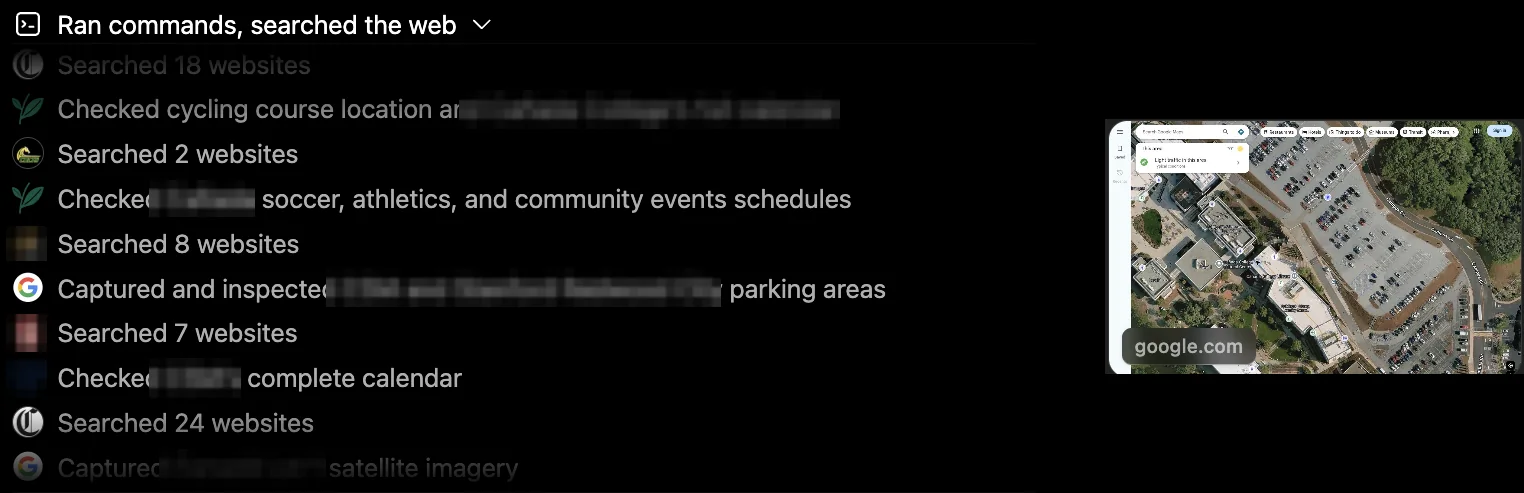
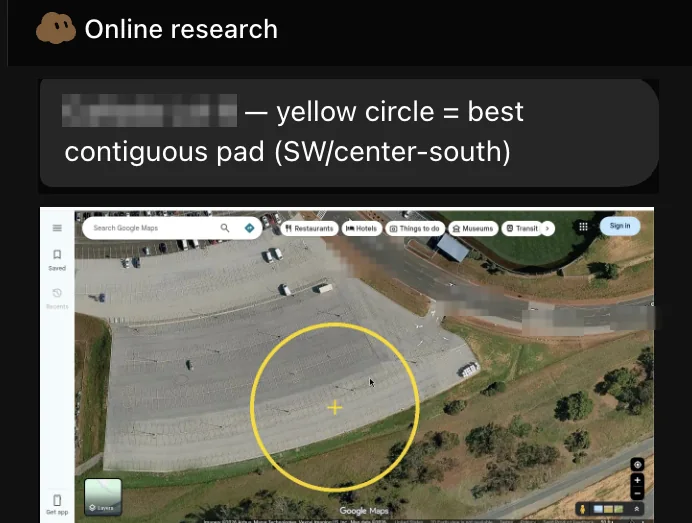
ChatGPT (top) and Grok Bot (bottom) scouting lots on Google Maps. Lot names and street labels are blurred; the satellite imagery is Google Maps.
04Results and trace analysis
In this section, we'll talk a bit about some interpretations of the results and our traces (which can be seen on our downloadable artifacts or through our trace viewer by clicking any attempt on the benchmark page). Before that, a quick note on how the percents on the benchmark homepage were calculated: since we had comma GPS and telemetry data as well as a cone-layout map/schematic, we made a course centerline, and evaluated progress % as how far along the course centerline the car got while staying within 4 meters of it. So it only ever increases (wrong-way driving and stops don't add anything). We found this to be a fair way to evaluate progress, since just using something like distance driven while inside the course would overestimate progress of models that went the wrong way or took a convoluted path.
- GPT-6 Astra was the only model to fully complete the course (on attempt 2, in about 5 minutes). Claude Fable 5.1's third attempt got around halfway through the course, as did Astra's first attempt. All other attempts didn't make it past the first corner. Generally, the failure there was one of perception: reading which side of the first diagonal cone line the lane is on.
"I picked the wrong side of the boundary again. The diagonal cone line was the lane's left edge, not its right edge." — Fable, reflecting after attempt 2
"The decisive error was assuming that cone color identified boundary side—for example, treating a green cone as the left boundary and a red cone as the right boundary. The course description explicitly says the mini-cones are multicolored." — Sol, after attempt 2
"The car is wider than the camera makes it look. Straight ahead was not a clear lane; it pointed at the planter, the wall, or the near red cone." — Grok, after attempt 1
- Astra observed about every 5–6 seconds and gave around 6 commands a minute. In Fable's second attempt, it drove for only 31 seconds out of 190, and most of it was spent reasoning while the car sat braked. Astra and Sol were the only models to actually replace a motion command before it ended.
"I then waited ~13 seconds before the next command. Expiry only starts braking; the car can still roll into a cone. […] Overlap every command. Replace while several seconds remain." — Grok, after attempt 2. In attempt 3 it then overlapped 0 of 2 commands and still left 10 s gaps.
- Astra and Fable showed real signs of in-context learning. Astra's attempt 1 reflection said "I declared the car aligned too early. […] I straightened and increased the requested speed to 1.5 m/s" and "Near islands and bends, I would use shorter travel increments at about 0.5–0.8 m/s". In attempt 2, it never exceeded 0.8 m/s, used 100% steering on 20/24 commands, and completed the course.
- Fable also showed great improvement from attempts 1/2 to attempt 3. Attempt 3 opened with "This time I keep the diagonal cone line on my left and run along the parking stalls" and it then drove the long straight correctly, though it unfortunately didn't leave enough room to make turn (D).
- In the prompt we gave an example to communicate what 100% steering meant, but we assumed the models would learn over the course of their attempts how the steering commands control the car. Astra ended up learning to hold 100% often (20/32 of its commands), while Fable started at 60–100%, reflected that it was too much, and ended up learning to default to 30%.
05Safety
We had a variety of measures to make sure that we were doing this as safely as possible. In our code we made sure to hard-limit the car to extremely low speeds through multiple layers (MCP tool and controller limited speed to 0.5-3.5 m/s (1-8 mph), an emergency stop in the code limited speed to 6 m/s (13 mph) and any speed above this cancels motion and disarms the system). We also made as few changes as possible to the openpilot code, preferring to build around it. We didn't disable any important safety features there such as driver monitoring. We constantly had an operator in the car during all of this, with his foot right above the brake, ready to step in.
Still, even with all these measures, please use our harness/code/protocol at your own risk. We've only tested this on our 2022 Toyota Corolla and there are likely things you would have to change to get this to work with other cars.
06Limitations and Reproducibility
We tried our best to make this as reproducible as possible, including publishing the schematic above of our cone course map, open sourcing our harness and prompts, and uploading all our traces. Reproducing this exact evaluation still requires a 2022 Toyota Corolla and a comma four, as well as building the course in a similar area (reach out to us privately if you want more information or help setting something up!).
Some other limitations include our Comma/openpilot/car setup limiting the turning angle of the car (and thus allowing for limited turn tightness), openpilot requiring the human to press RES before the first motion command could move the car from a standstill (identical for every attempt, so some first commands took effect a few seconds late), and openpilot's launch overshoot, which is not model-specific: on every attempt the first motion command from a standstill reached about 1.6–2.4 m/s on requests of 0.8–1.5 m/s, and the trial's highest speeds were 2.8 m/s (Sol, attempt 3) and 2.4 m/s (Grok, attempt 2). The prompt's steering example was also conservative: it says 100% steering makes a 90° turn in about 60 s at 1 m/s, while the GPS tracks put the full-lock radius at about 14 m, i.e. roughly 25 s for 90° at 1 m/s; every model received the same text. Additionally, the forward camera in the Comma can't see things extremely close to the car (such as a curb that's almost under the car), or anything on the left/right side or behind the car. It also has a wide angle camera that we used as well which is a bit better but still not perfect at all.
A general limitation not of our system intrinsically but of our benchmark is that we only were able to evaluate each model once (multiple attempts, but they aren't independent since same-context). For our next iteration we hope to:
- evaluate models multiple times across the multi-attempt system
- evaluate across different reasoning efforts
- slim down and make the prompt even more generic to further test the limits of these LLMs
- evaluate more models, in a more difficult or longer course.
07Conclusion
Frontier models have improved to the point where they can drive real vehicles in real life at sufficiently low speeds. We expect progress to continue to improve in this area as further related data is added to the training mix, model inference speeds / latency improve, and model planning and in-context learning abilities sharpen over time. While the success of the models on this benchmark was shocking and exciting to see, this also calls for additional pressing work on safety/alignment/evaluation. We plan to share more on this very soon.
Acknowledgements
Thanks to comma.ai for making the comma four and openpilot, and to Jay Chooi at RoboCurve for inspiration! We also would like to credit Codex/Claude Code/Cursor as the harnesses we used for evaluation, as well as part of the development/implementation process.
Citation
Please cite this work as:
@misc{drivingbench2026,
  title  = {DrivingBench: Frontier language models driving a real car through a cone course},
  author = {Aditya Ramabadran and Simon Mahns and Tobias Gessler},
  year   = {2026},
  url    = {https://drivingbench.com/report},
}